Scaling JEV-like Decision Models with SGLang
A customer asks whether an order has shipped. An agent already has the order ID and three possible next actions: query the order-status service, search general delivery-policy documentation, or ask the customer for the ID. Before it can act, it needs to choose.
A JEV-like decision model can return a category or score instead of a prose explanation. Application code uses that signal to act. Efficient serving starts with two choices: what information each judgment should see and how to return the scores the application needs.
In this post, we explain pointwise and setwise prompts, use Open-Jev's candidate evaluations as a concrete example, and show where SGLang's Score API and shared-context execution improve pointwise serving. We then compare Fused-Choice and Setwise scoring when all candidates appear together. Throughout, we focus on next-token label scoring with causal language models rather than long-form generation.
TL;DR
- Make the output contract explicit. With
/v1/score, callers request specific label-token scores rather than relying on those labels to appear in a generation response's top-k logprobs. - Separate prompt semantics from execution. Pointwise and setwise describe what information a judgment can see. SIS and MIS describe how the runtime executes scoring requests.
- Reuse the repeated query. Multi-item scoring (MIS) shares query computation within a request while keeping pointwise candidates isolated. In the plotted workloads, its latency grows much less with candidate count and offered load.
- Measure serving performance at the intended load. Benefits vary by model and configuration. Compare achieved throughput and tail latency, not just the offered request rate.
The Nature of a Decision LLM
In our example, the inputs are the current state, a question, and the available actions. Selecting a category is classification. Assigning suitability scores to actions is scoring; those scores can drive selection or ranking. This abstraction describes a serving workload, not the internals of a proprietary JEV model. It is not a substitute for training a good decision model.
An LLM can produce this signal through a trained classification head or through scores for answer tokens such as Yes/No or A/B/C. We focus on the latter. At the answer boundary, the position where the answer would begin, a causal language model already provides a distribution over possible next tokens. If the model expresses the required judgment at that position, the application can read the relevant scores without asking for an explanation.
The next question is what information each judgment should see.
Two Ways to Ask the Decision Question
Keep the actions fixed: A is "query the order-status service," B is "search general delivery-policy documentation," and C is "ask the customer for the order ID." We can arrange these inputs in two ways, commonly called pointwise and setwise in recommendation and ranking systems.
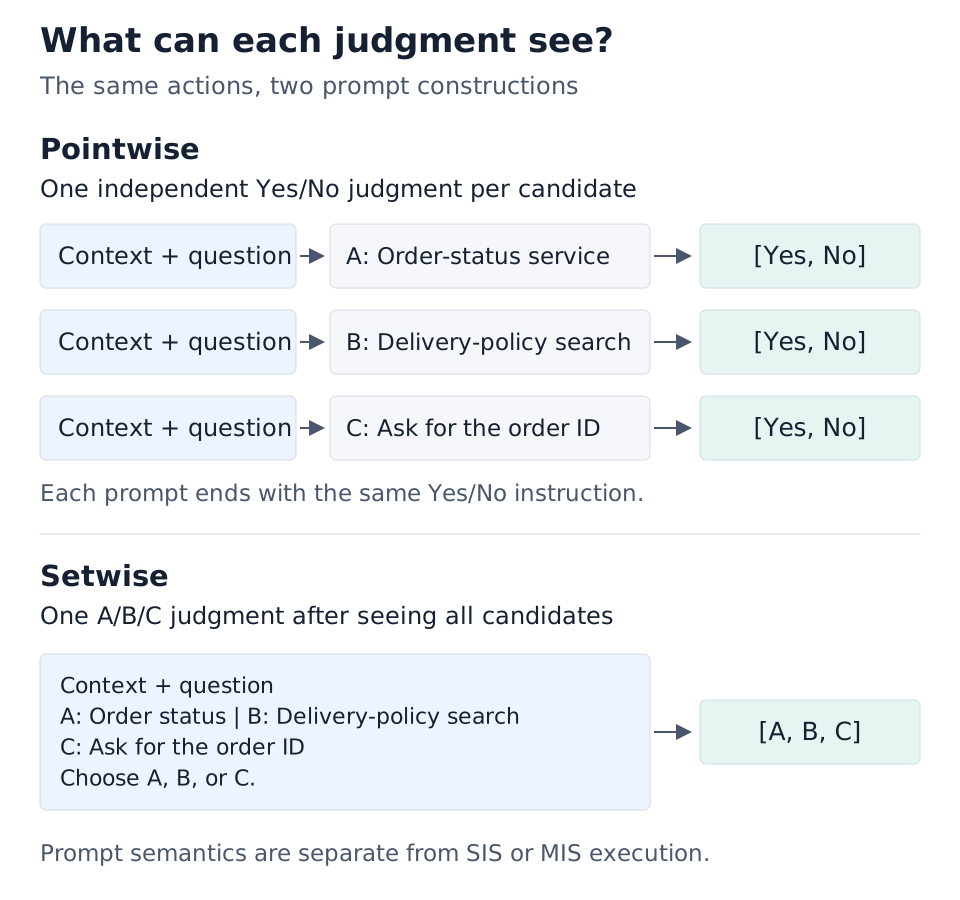
Figure 1. Pointwise and setwise prompt construction.
What to notice: The distinction is what each judgment can see, not which API serves it. Pointwise scoring produces one Yes/No score row per candidate, with the other candidates hidden; the illustrated setwise formulation produces one A/B/C row after seeing all options. Both can use explicit label scoring, but their scores have different meanings. Sharing query computation with MIS is an execution optimization, not a switch from pointwise to setwise reasoning.
These prompt constructions need not yield the same decision. Choose the formulation based on the task and the model's training, including whether candidates should influence one another.
Open-Jev Makes the Pointwise Pattern Concrete
Open-Jev's public request compiler builds independent candidate prompts for choice tasks. Each prompt contains a shared context-and-question prefix, one proposed answer, and an instruction to answer Yes or No.
That gives us a useful serving workload: repeated state, multiple independent evaluations, and very small outputs.
Why a Decision Workload Deserves a Scoring Interface
One-token generation with logprobs is a workable baseline, but its top-k response may omit a label the application needs. SGLang's /v1/score lets the caller declare those labels explicitly through label_token_ids, alongside query and items. Ordinary next-token scoring returns one row per item, in the requested label order.
For causal-LM label scoring, an explicit score-only workload lets the runtime skip token sampling, avoid unnecessary logprobs for input tokens, gather label scores in batches, and reduce repeated GPU-to-CPU transfers. This label-selective extraction does not remove the vocabulary projection or full-distribution normalization.
Both scoring and modern one-token generation can return a result directly from prefill; generation does not inherently require an extra model forward pass. Beyond the output path, SGLang supports single-item scoring (SIS) and multi-item scoring (MIS) execution:
- SIS: each query-plus-item pair is an independent logical sequence. One API request may still contain several items.
- MIS: the runtime explicitly reuses the shared query within a request and restricts each candidate's attention to that query and its own tokens.
The Score API also supports SequenceClassification models such as Qwen3ForSequenceClassification, Qwen2ForSequenceClassification, and LlamaForClassification out of the box, using their classification heads (PR #22118). The benchmarks below focus on next-token label scoring with causal language models.
Benchmark: Pointwise Decisions
We use choice tasks from the Open-Jev dataset, with the state and question shared across candidate evaluations.
| Component | Setup |
|---|---|
| Models | Qwen3-0.6B, Qwen3-8B, and Qwen3.5-4B |
| Accelerator | One NVIDIA H200 GPU |
| Software | SGLang on CUDA 13.0, with mode-specific server configurations |
| Serving approaches | Generate with max_tokens=1, SIS, and MIS |
| Latency metric | p95 end-to-end time to complete a question's candidate evaluations |
| Load unit | Questions per second, not individual candidates per second |
Each question is complete when all of its candidates have been evaluated. We report p95 time to decision, the latency threshold covering 95% of successful questions, rather than the time to score one candidate.
These plots compare serving configurations, not an isolated API change: MIS has backend and cache requirements that differ from ordinary generation and SIS. The appendix describes the clients, server settings, and measurement checks.
Latency at Matched Target Load
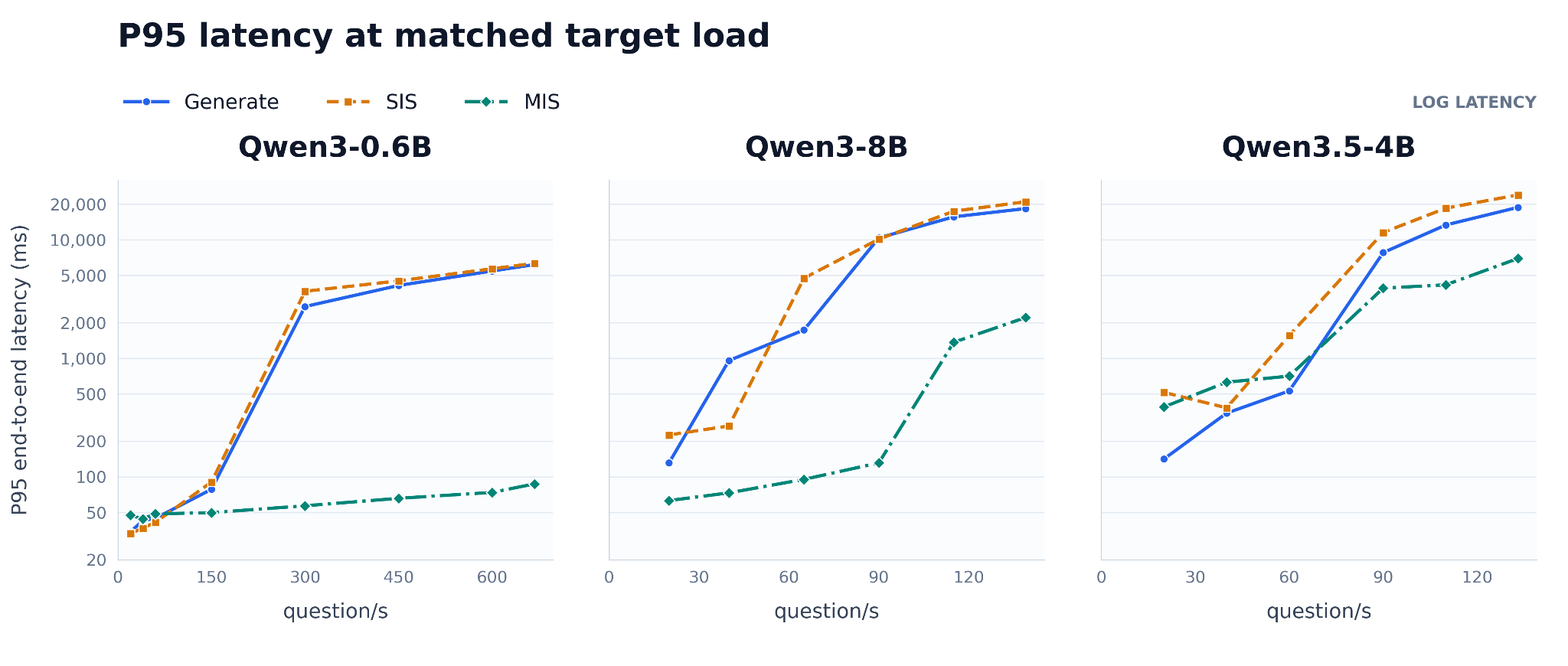
Figure 2. Pointwise p95 end-to-end latency at matched target load across three models (log scale).
What to notice: MIS's largest advantage appears as load rises; it is not consistently faster at low load.
- Qwen3-0.6B: Its p95 stays below roughly 100 ms across the plotted range while Generate and SIS climb into seconds.
- Qwen3-8B: MIS stays near 130 ms through 90 questions/s, then rises sharply at the next load point: it delays saturation rather than eliminating it.
- Qwen3.5-4B: Shows a smaller advantage, and Generate is faster at low load. At the highest plotted load, MIS's p95 latency is roughly one-third that of the other two paths.
These are latency ratios at the same offered load, not throughput multipliers, and the panels use different questions-per-second (QPS) ranges. Offered QPS alone does not show how many questions the server completes per second or whether the client can maintain the requested arrival rate.
Latency as Candidate Count Grows
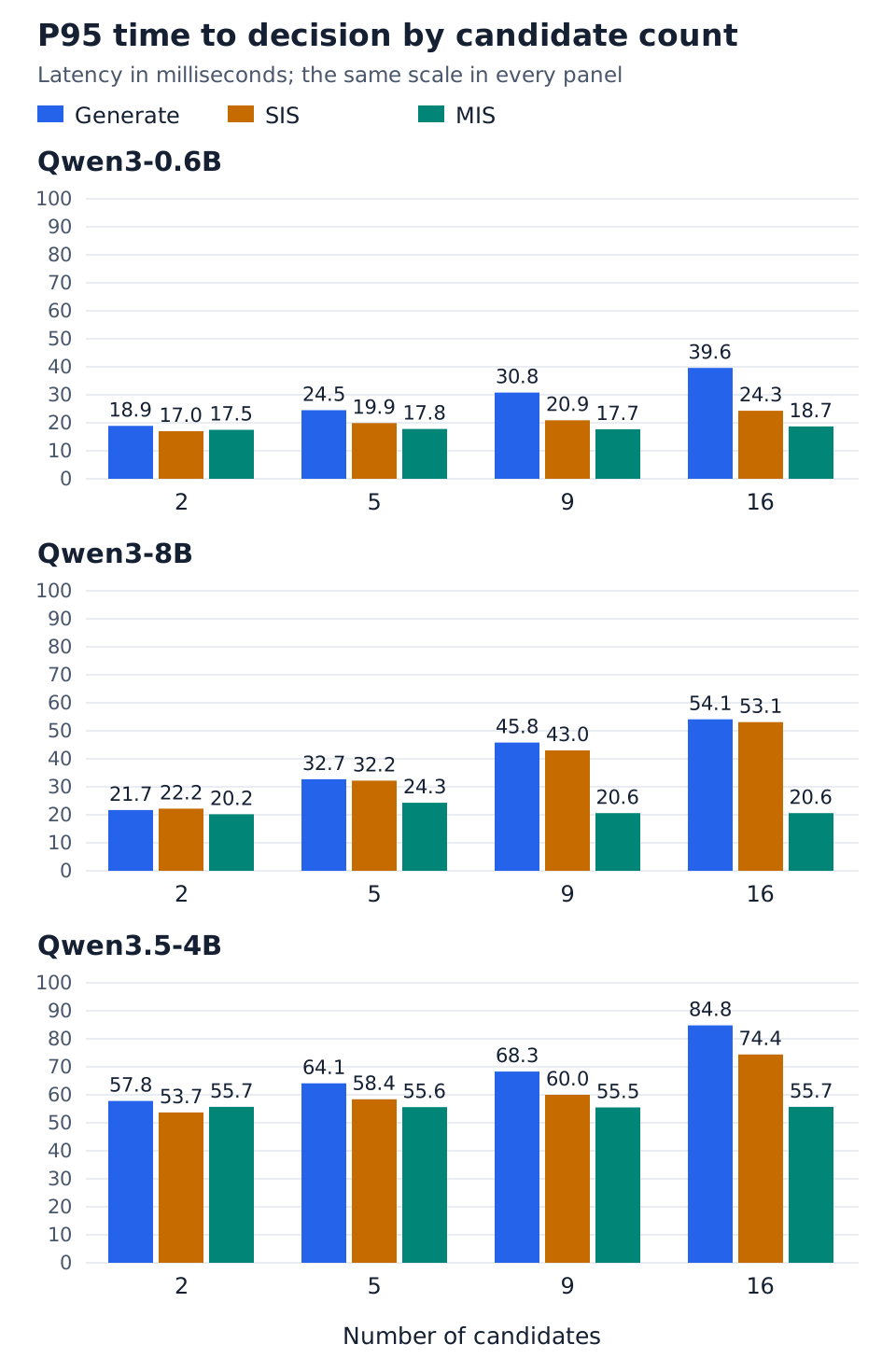
Figure 3. Pointwise p95 time to decision by candidate count.
What to notice: MIS latency is nearly flat as the number of options grows from 2 to 16, consistent with amortizing shared-query computation across candidates. At 16 options, Qwen3-0.6B takes 18.7 ms with MIS versus 39.6 ms for Generate and 24.3 ms for SIS; Qwen3-8B takes 20.6 ms versus 54.1 ms and 53.1 ms, respectively. The gain is smaller on Qwen3.5-4B: 55.7 ms versus 84.8 ms and 74.4 ms, respectively. With just two options, SIS is slightly faster than MIS on Qwen3-0.6B and Qwen3.5-4B.
Candidate-count groups contain different questions with different token lengths, so this is an observed workload trend, not an experiment that isolates the effect of candidate count.
These benchmarks evaluate serving performance only; they do not establish equivalent decisions across prompt formulations or execution modes.
Why MIS Helps Pointwise Decisions
Pointwise candidates repeat the same state and question. SIS processes them as separate logical sequences, even when one request contains several items. Continuous batching and prefix caching can help, but batching alone does not guarantee shared computation.
MIS explicitly reuses the shared query within a request. On supported models and backends, candidate-isolating attention keeps each item restricted to that query and its own tokens. The intended benefit is less repeated work without changing which information each judgment can use.
MIS requires a supported model, backend, and server configuration; selecting /v1/score alone does not enable it. A single-boundary setwise prompt already contains all options in one logical input and does not need candidate-isolating MIS.
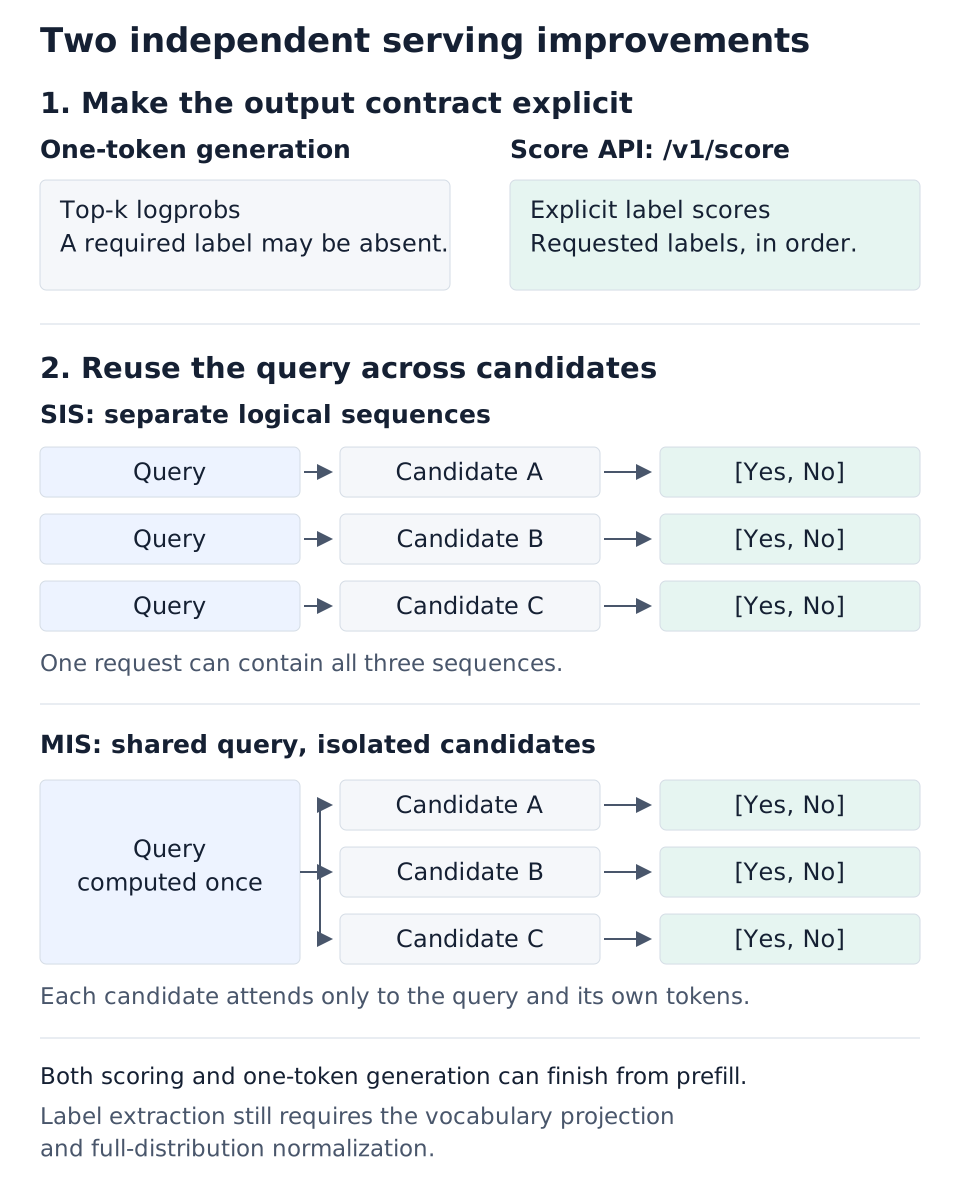
Figure 4. Explicit label scoring and shared-query execution address different parts of the serving workload.
What to notice: These are two independent benefits: requesting labels explicitly avoids relying on a top-k response that may omit a required label, while MIS reuses query computation across otherwise independent candidates. SIS can batch several candidates in one request without fusing their logical sequences. Neither benefit depends on eliminating an extra generation forward pass, and label-selective extraction still requires the vocabulary projection and full-distribution normalization.
Benchmark: Fused-Choice vs. Setwise Scoring
How do generation and scoring compare when both approaches see every candidate in a single prompt? We ran a separate comparison between Fused-Choice through /v1/completions and anchor-based Setwise scoring through /v1/score. Both include the full candidate text in one prompt, but read the decision differently:
| Approach | Where scores are read | How the candidate is selected |
|---|---|---|
| Fused-Choice | A/B/C-style logprobs at one answer boundary | Highest-scoring candidate letter |
| Anchor-based Setwise | A Yes/No row at each candidate's score-extraction marker | Candidate with the highest Yes score |
For Setwise, the prompt ends with one <|object_ref_start|> marker per candidate. This is a different output contract from the single-boundary example in Figure 1. The chart label Setwise (SIS) means anchor-based scoring with MIS disabled, not the independent pointwise SIS requests in Figures 2 and 3. MIS is N/A for this comparison.
Scope of this comparison: The results below evaluate serving latency and throughput only; they do not establish equivalent decision quality between Fused-Choice and Setwise.
Example: Same Candidates, Different Readout Positions
Using the order-status scenario from the introduction, the benchmark's two prompt constructions look like this.
Fused-Choice: one answer boundary for the whole decision
Context:
The customer supplied an order ID and wants to know whether that order has shipped.

Question: Which action should the agent take next?

Options:
A) Query the order-status service.
B) Search general delivery-policy documentation.
C) Ask the customer for the order ID.

Choose the single correct option above. Your entire response must be exactly one letter: A, B, or C. Do not include any other words, punctuation, or explanation.
This text is the user-message body. The client applies the model's non-thinking chat template, then sends the resulting token IDs to /v1/completions with max_tokens=1 and logprobs=20. It selects the candidate with the highest available letter logprob at that single answer boundary.
Setwise: one Yes/No readout per candidate
Context:
The customer supplied an order ID and wants to know whether that order has shipped.

Question: Which action should the agent take next?

For each candidate answer below, decide whether it is correct. Respond with Yes or No at each marker.

A) Query the order-status service.
B) Search general delivery-policy documentation.
C) Ask the customer for the order ID.
Scores:<|object_ref_start|><|object_ref_start|><|object_ref_start|>
For /v1/score, the context, question, and instruction form query; the candidate list and markers form one entry in items. The request specifies score_extraction_token="<|object_ref_start|>", the tokenizer's Yes/No IDs in label_token_ids, and apply_softmax=True.
The three markers correspond to A, B, and C in order. The response contains one item with three label-score rows:
scores[0] = [
    [yes_score_A, no_score_A],
    [yes_score_B, no_score_B],
    [yes_score_C, no_score_C],
]
The application selects the row with the highest Yes score. All markers follow the complete candidate list, so each readout can attend to every candidate. The markers identify where to extract scores; they do not, by themselves, teach the checkpoint to make accurate per-candidate judgments.
A Shared Server Configuration
Both endpoints ran on the same server for each model, using its default FA3 attention backend, with radix caching disabled and chunked_prefill_size=-1 for both. Fused-Choice applied the model's non-thinking chat template client-side; smoke tests compared its prompt-token counts and outputs with the chat-completions endpoint before measurement.
| Component | Setup |
|---|---|
| Models | Qwen3-0.6B, Qwen3-8B, and Qwen3.5-4B |
| Accelerator | One NVIDIA H200 GPU |
| Software | SGLang on CUDA 13.0 |
| Serving approaches | Fused-Choice and Setwise (SIS) |
| Latency metric | p95 end-to-end time to complete a question's candidate evaluations |
| Load unit | Questions per second, not individual candidates per second |
We use choice tasks from the Open-Jev dataset, drawing from its training split to provide enough distinct questions for approximately 20 seconds of scheduled arrivals at each target QPS. Fused-Choice and Setwise receive identical questions and arrival schedules, enabling a controlled comparison within this experiment. The pointwise load results use the test split and should be interpreted as a separate experiment.
Latency at Matched Target Load
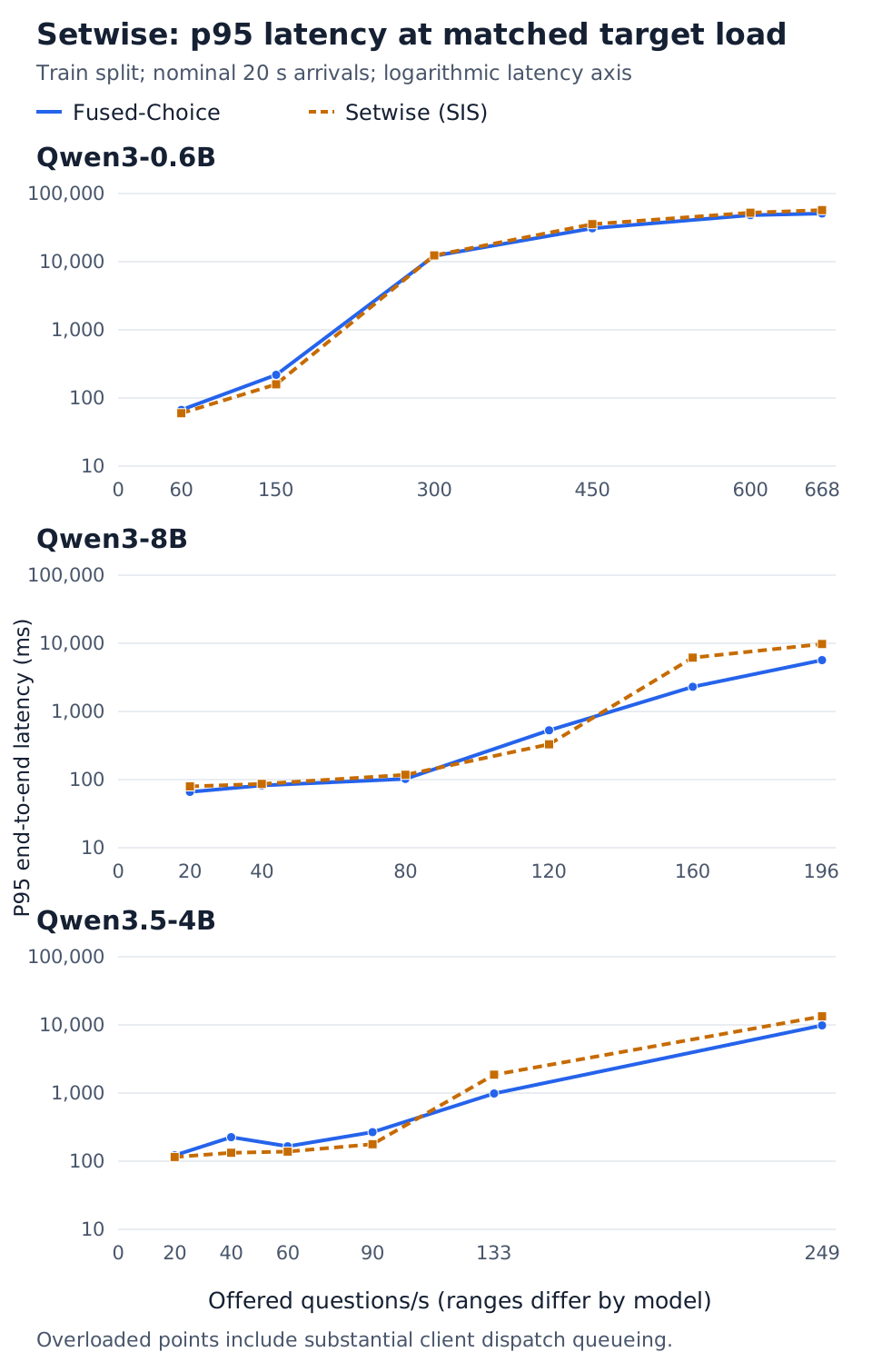
Figure 5. Fused-Choice vs. Setwise p95 end-to-end latency under a shared server configuration. Target QPS is offered load, not achieved throughput.
What to notice: Neither approach wins at every load.
- Qwen3-0.6B: Setwise has lower p95 at 60 and 150 QPS; both accumulate large queues from 300 QPS onward.
- Qwen3-8B: Setwise is lower at 120 QPS (330 vs. 528 ms), while Fused is lower at 196 QPS (5.7 vs. 9.8 seconds).
- Qwen3.5-4B: Setwise is lower from 20 through 90 QPS, but Fused wins at 133 and 249 QPS. The non-monotonic Fused points also warrant repeated measurements before choosing a deployment threshold.
At 668 offered QPS on 0.6B, achieved throughput is only 182 questions/s for Fused and 167 for Setwise. Substantial pre-dispatch client queueing contributes to the high-load latency: these points characterize the complete client/server setup, not an isolated GPU throughput ceiling. One sweep per load is not a confidence interval.
Latency as Candidate Count Grows
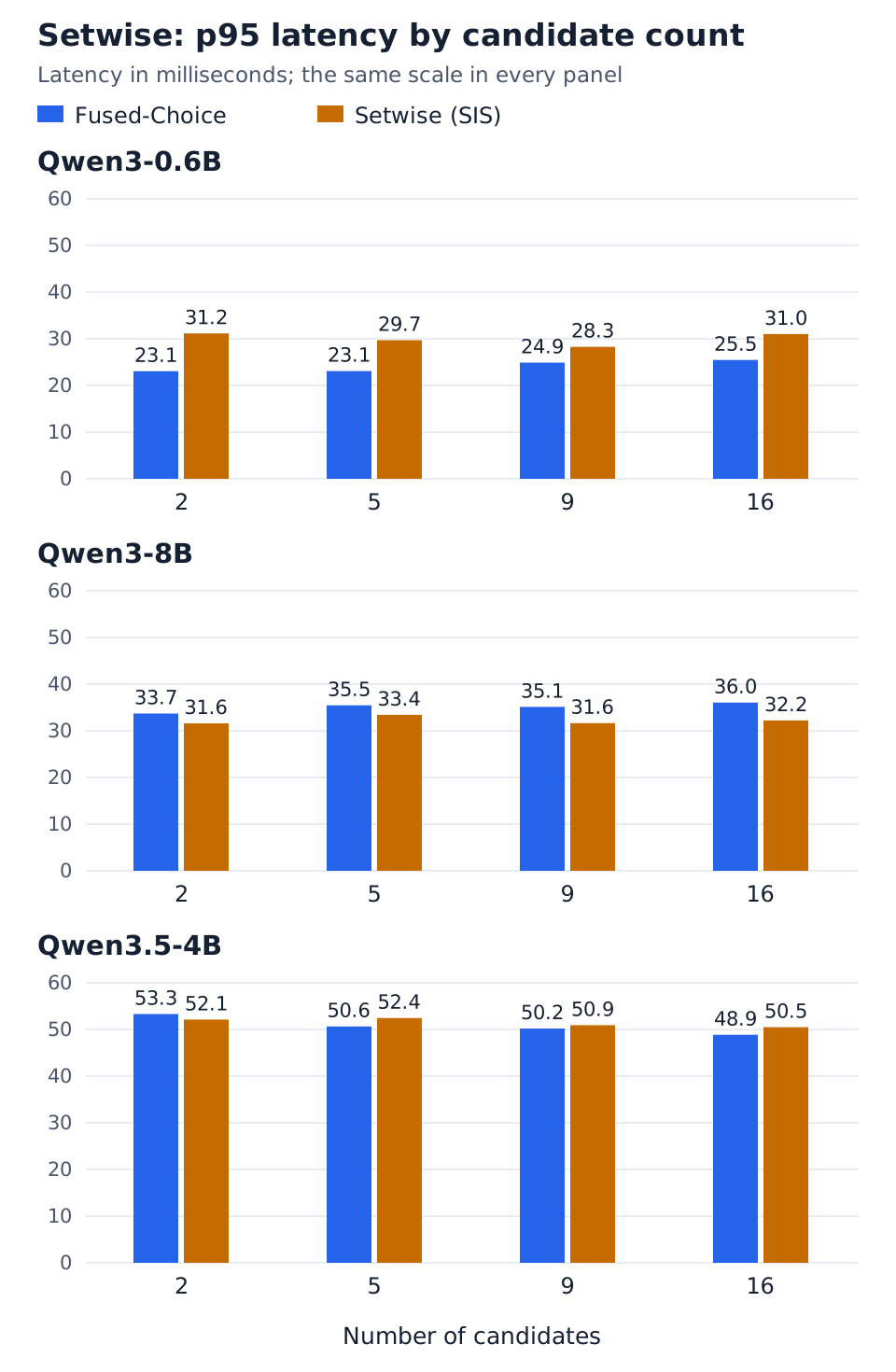
Figure 6. Low-load Fused-Choice vs. Setwise p95 decision latency by candidate count, using the test split at concurrency 1.
What to notice: Both approaches show weak candidate-count dependence because each question is processed as one logical sequence. At 16 candidates, Qwen3-0.6B takes 25.5 ms for Fused versus 31.0 ms for Setwise; Qwen3-8B takes 36.0 versus 32.2 ms; and Qwen3.5-4B takes 48.9 versus 50.5 ms. There is no consistent twofold Fused-Choice advantage under this configuration. As with Figure 3, the candidate-count groups contain different questions and token lengths.
Choosing a Serving Path
Choose the prompt formulation and output contract for your application, then compare serving paths under the intended load:
- Independent candidate judgments: use the Score API for explicit label scores. When the context is repeated and the model/backend support it, evaluate MIS for shared-query reuse.
- A joint choice among candidates: compare Fused-Choice and Setwise scoring under the same server configuration, accounting for their different output contracts.
- A production latency target: measure achieved throughput and tail latency at the intended load, with enough client capacity to avoid mistaking a load-generator limit for a server limit.
Getting Started with the Score API
The following pointwise example returns one Yes/No row for each possible action in our opening scenario.
Deploy a Server
Launch a standard server for SIS. Each query-plus-item pair is evaluated as an independent sequence:
python -m sglang.launch_server \
  --model-path Qwen/Qwen3-0.6B \
  --host 127.0.0.1 \
  --port 30000
For MIS on this model, enable FlashInfer and disable the radix cache and chunked prefill:
python -m sglang.launch_server \
  --model-path Qwen/Qwen3-0.6B \
  --host 127.0.0.1 \
  --port 30000 \
  --attention-backend flashinfer \
  --disable-radix-cache \
  --chunked-prefill-size -1 \
  --enable-mis
Run one configuration at a time on the selected port. These examples require a SGLang build with the Score API and the relevant MIS support.
- MIS reuses the shared query while keeping candidate items isolated.
- FlashInfer provides the required attention-mask support for this configuration.
- Radix caching and chunked prefill are disabled for this MIS execution path.
Send a Scoring Request
Send one /v1/score request containing the shared query and all choices. Derive label token IDs from the checkpoint's tokenizer rather than copying IDs between models:
import requests
from transformers import AutoTokenizer

model = "Qwen/Qwen3-0.6B"
tokenizer = AutoTokenizer.from_pretrained(model)
labels = ["Yes", "No"]
encoded_labels = [
    tokenizer.encode(label, add_special_tokens=False) for label in labels
]
if any(len(ids) != 1 for ids in encoded_labels):
    raise ValueError("Each scoring label must encode to exactly one token.")
label_token_ids = [ids[0] for ids in encoded_labels]

query = (
    "Context:\n"
    "The customer supplied an order ID and wants to know whether "
    "that order has shipped.\n\n"
    "Question: Which action should the agent take next?\n"
)

items = [
    "Proposed answer: Query the order-status service.\n"
    "Is this proposed answer correct? Answer Yes or No.",
    "Proposed answer: Search general delivery-policy documentation.\n"
    "Is this proposed answer correct? Answer Yes or No.",
    "Proposed answer: Ask the customer for the order ID.\n"
    "Is this proposed answer correct? Answer Yes or No.",
]

response = requests.post(
    "http://localhost:30000/v1/score",
    json={
        "model": model,
        "query": query,
        "items": items,
        "label_token_ids": label_token_ids,
        "apply_softmax": True,
    },
    timeout=60,
)
response.raise_for_status()

scores = response.json()["scores"]
if len(scores) != len(items) or any(len(row) != len(labels) for row in scores):
    raise ValueError("Expected one [Yes, No] score row per candidate.")
selected = max(range(len(items)), key=lambda index: scores[index][0])
print(items[selected])
The columns follow the requested label order: index 0 is Yes, index 1 is No. With apply_softmax=True, the scores are normalized across those labels for each candidate, not across candidates. They are not automatically calibrated correctness probabilities.
This is a minimal serving example. A production prompt should match the checkpoint's training and the application's required output contract.
Summary
Decision workloads often need a small, structured signal rather than generated prose. SGLang's Score API makes that output contract explicit, and MIS provides a separate opportunity to reuse the context repeated across pointwise candidates.
The measurements illustrate where that reuse is valuable: more candidates and higher offered load. The gains are not uniform across architectures; measure achieved throughput and tail latency under the intended load to assess deployment capacity.
For prompts that expose all candidates together, the separate Fused-Choice/Setwise study shows that latency can be comparable when both endpoints share the same server configuration. Which is faster depends on the model and offered load.
For more background on high-performance prefill-only decision models, see this paper. We welcome further contributions to scoring support and performance in SGLang, including work outlined in the prefill-only roadmap.
Acknowledgements
This post was developed in collaboration with the SGLang and LinkedIn teams.
LinkedIn: Chuanrui Zhu, Sundara Raman Ramachandran, Shri Rajamanikandan Vasudevan, Qing Lan, Jian Sheng, I-Ting Chen, Fedor Borisyuk
SGLang: Liangsheng Yin, Qiaolin Yu, Lingyan Hao, Mingyi Lu
Additional contributors to the performance optimizations:
- NVIDIA: Po-Han Huang, for the Qwen3.5 MIS contribution
- TikTok: Hongyu Lu
Appendix: Reproduction Steps
The benchmark clients are available in chuanrui/sglang-benchmark, under lmsys_blog/jev_bench. The examples below use Qwen3-0.6B on one H200 and cover the pointwise experiments: a closed-loop concurrency sweep with candidate-count breakdowns and an open-loop QPS sweep. The separate Setwise study's server configuration and protocol differences are described below.
These are instructions for rerunning the workloads, not a guarantee of reproducing every plotted value. The script revision is pinned below, but reproducing the original numbers also requires matching the original SGLang build and resource allocation. The examples use a larger client worker pool and avoid periodic cache flushes during timed open-loop traffic; these settings differ from some of the original runs.
Setup
Use a Linux GPU host with Python 3.12 and a compatible CUDA 13.0 SGLang environment. Follow the SGLang installation instructions for the appropriate CUDA build. Use the same SGLang version and model snapshot for all approaches, and save the installed package versions with the results.
Clone the clients and install their additional dependencies in that environment:
git clone https://github.com/chuanrui/sglang-benchmark.git
cd sglang-benchmark
git checkout 1a5972c601d0d6bae33a651c7bd951538c7b0ddc
cd lmsys_blog/jev_bench

python -m pip install pandas pyarrow transformers huggingface_hub
Download the dataset and model. The dataset directory must contain the split's Parquet files, not just the dataset repository root:
export MODEL_ID=Qwen/Qwen3-0.6B
export DATA_ROOT="$PWD/data/open-jev"

python - <<'PY'
import os
from huggingface_hub import snapshot_download

snapshot_download(
    "ZefanCai/Open-Jev",
    repo_type="dataset",
    revision="c67699e13d0ae25e35b77165a4b6b079bedc8aba",
    allow_patterns=["data/release-v2-redistributable/*"],
    local_dir=os.environ["DATA_ROOT"],
)
PY

export DATA="$DATA_ROOT/data/release-v2-redistributable"
export MODEL="$(python -c 'import os; from huggingface_hub import snapshot_download; print(snapshot_download(os.environ["MODEL_ID"]))')"
export SERVER=http://127.0.0.1:30000
export OUT="$PWD/results/qwen3-0.6b"
mkdir -p "$OUT"

python -m pip freeze > "$OUT/packages.txt"
git rev-parse HEAD > "$OUT/benchmark-revision.txt"
printf '%s\n' "$MODEL" > "$OUT/model-snapshot.txt"
The model download resolves to a local snapshot directory; retain that path and revision rather than silently downloading a newer checkpoint for a later comparison.
Use the same variables and activated environment in the server and client terminals.
Start the Generate/SIS Server
In the server terminal, launch the tuned configuration used by the published Generate/SIS drivers:
python -m sglang.launch_server \
  --model-path "$MODEL" \
  --host 127.0.0.1 --port 30000 \
  --schedule-policy lpm \
  --chunked-prefill-size 4096 \
  --enable-mixed-chunk \
  --max-running-requests 256
Wait for startup and warmup to finish. In the client terminal, verify readiness and record the effective configuration:
curl --fail --show-error "$SERVER/health"
curl --fail --show-error "$SERVER/get_server_info" \
  > "$OUT/server-info-generate-sis.json"
The pointwise Generate baseline below uses batched completions: one /v1/completions request contains the independent candidate prompts for a question. The client applies the model's chat template before sending them. This is not Fused-Choice, which puts all options into one multiple-choice prompt.
Closed-Loop: Generate and SIS
Run both clients sequentially against the same server:
for C in 1 8 16 32 64 128; do
  python benchmark_sglang_batched_completions.py \
    --dataset-dir "$DATA" --model-path "$MODEL" \
    --split test --num-questions 200 --seed 42 \
    --warmup 1 --repetitions 10 --concurrency "$C" \
    --top-logprobs 5 --flush-cache-each-round \
    --server "$SERVER" --output "$OUT/closed_generate_c$C"

  python benchmark_sglang_score_api.py \
    --dataset-dir "$DATA" --model-path "$MODEL" \
    --split test --num-questions 200 --seed 42 \
    --warmup 1 --repetitions 10 --concurrency "$C" \
    --flush-cache-each-round \
    --server "$SERVER" --output "$OUT/closed_sis_c$C"
done
Here, concurrency counts in-flight questions, not candidate prompts. Use the latency_ms_by_candidate_count field in the concurrency-1 outputs for a breakdown like Figure 3. Flushing between rounds removes cross-round cache reuse but does not eliminate reuse among prompts within a round.
Open-Loop: Generate and SIS
The open-loop clients schedule questions using Poisson arrivals. Their end-to-end latency starts at the scheduled arrival time, so it includes waiting for a client worker as well as the subsequent HTTP request.
QPS_TARGETS="20 40 60 150 300 450 600 668"
DURATION=20
QPS_PER_WORKER=2

for Q in $QPS_TARGETS; do
  curl --fail --show-error -X POST "$SERVER/flush_cache"
  python benchmark_sglang_batched_completions_openloop.py \
    --dataset-dir "$DATA" --model-path "$MODEL" \
    --split test --num-questions 100000 --seed 42 \
    --qps "$Q" --duration "$DURATION" \
    --qps-per-worker "$QPS_PER_WORKER" \
    --top-logprobs 5 --flush-cache-interval 0 \
    --server "$SERVER" --output "$OUT/open_generate_qps$Q"

  curl --fail --show-error -X POST "$SERVER/flush_cache"
  python benchmark_sglang_score_api_openloop.py \
    --dataset-dir "$DATA" --model-path "$MODEL" \
    --split test --num-questions 100000 --seed 42 \
    --qps "$Q" --duration "$DURATION" \
    --qps-per-worker "$QPS_PER_WORKER" --flush-cache-interval 0 \
    --server "$SERVER" --output "$OUT/open_sis_qps$Q"
done
Flush only after the preceding run has drained, with no other traffic on the server. The published drivers flush the cache every five seconds for Generate/SIS; this example disables that behavior to avoid mixing cache-maintenance effects into the timed load sweep. Distinct questions can still share prefixes, so neither policy should be described as eliminating all cache reuse.
Restart for MIS, Then Run the Same Workloads
Stop the Generate/SIS server in its terminal and wait for its workers to exit and release GPU memory. Launch the MIS configuration instead; do not run the two servers concurrently on the same GPU:
python -m sglang.launch_server \
  --model-path "$MODEL" \
  --host 127.0.0.1 --port 30000 \
  --attention-backend flashinfer \
  --disable-radix-cache \
  --chunked-prefill-size -1 \
  --enable-mis
Verify readiness again. MIS uses the same Score API client as SIS; the server flag changes execution:
curl --fail --show-error "$SERVER/health"
curl --fail --show-error "$SERVER/get_server_info" \
  > "$OUT/server-info-mis.json"

for C in 1 8 16 32 64 128; do
  python benchmark_sglang_score_api.py \
    --dataset-dir "$DATA" --model-path "$MODEL" \
    --split test --num-questions 200 --seed 42 \
    --warmup 2 --repetitions 20 --concurrency "$C" \
    --server "$SERVER" --output "$OUT/closed_mis_c$C"
done

for Q in $QPS_TARGETS; do
  python benchmark_sglang_score_api_openloop.py \
    --dataset-dir "$DATA" --model-path "$MODEL" \
    --split test --num-questions 100000 --seed 42 \
    --qps "$Q" --duration "$DURATION" \
    --qps-per-worker "$QPS_PER_WORKER" --flush-cache-interval 0 \
    --server "$SERVER" --output "$OUT/open_mis_qps$Q"
done
MIS has radix caching disabled, so it needs no between-run cache flush. The examples follow the original closed-loop repetition counts: 1 warmup round and 10 measured rounds for Generate/SIS, and 2 warmup rounds and 20 measured rounds for MIS. Keep the question sample fixed, and report those different repetition counts when comparing the outputs.
Other Models and Clients
Repeat the server/client sequence with a new model snapshot and a separate output directory:
| Model | Suggested QPS_TARGETS matching the plotted range |
|---|---|
Qwen/Qwen3-0.6B | 20 40 60 150 300 450 600 668 |
Qwen/Qwen3-8B | 20 40 65 90 115 139 |
Qwen/Qwen3.5-4B | 20 40 60 90 110 133 |
Do not assume that the same worker count provides sufficient headroom on every model, especially near saturation.
The repository also provides benchmark_sglang_jev.py and benchmark_sglang_jev_openloop.py for the N-calls Generate baseline, which sends a separate chat-completion request per candidate. To measure that alternative on the Generate/SIS server:
python benchmark_sglang_jev.py \
  --dataset-dir "$DATA" --split test --num-questions 200 --seed 42 \
  --warmup 1 --repetitions 10 --question-concurrency 1 \
  --flush-cache-each-round \
  --server "$SERVER" --output "$OUT/closed_generate_ncalls_c1"

python benchmark_sglang_jev_openloop.py \
  --dataset-dir "$DATA" --split test --num-questions 100000 --seed 42 \
  --qps 20 --duration 20 --qps-per-worker 2 --flush-cache-interval 0 \
  --server "$SERVER" --output "$OUT/open_generate_ncalls_qps20"
Here, --question-concurrency 1 dispatches one question's candidates concurrently and waits for all of them; ordinary --concurrency in this N-calls client counts individual candidate requests instead. Keep this alternative separate from batched-completions results. Fused-Choice and anchor-based Setwise clients are also included in the repository README; they change the prompt/output contract and are not part of the pointwise reproduction above.
Setwise Study: Shared Server Configuration
Figures 5 and 6 used the CausalLM Setwise implementation at commit 0bf2d16316c4fce8cf969e43ee53112c02b19842 of sgl-project/sglang#41188, rather than the pointwise server configurations above. With that revision installed in a compatible CUDA 13.0 environment, launch one server for both endpoints:
python -m sglang.launch_server \
  --model-path "$MODEL" \
  --host 127.0.0.1 --port 30000 \
  --disable-radix-cache \
  --chunked-prefill-size -1
Do not enable MIS or override the attention backend; verify that the effective backend is FA3 for these checkpoints. For the load sweep, use --split train, 20-second nominal arrivals, seed 42, and the following target rates:
| Model | Setwise-study target QPS |
|---|---|
| Qwen3-0.6B | 60 150 300 450 600 668 |
| Qwen3-8B | 20 40 80 120 160 196 |
| Qwen3.5-4B | 20 40 60 90 133 249 |
The published benchmark_sglang_setwise_openloop.py contains the anchor-based request builder. The published Fused-Choice client uses /v1/chat/completions; this study adapted it to /v1/completions by applying tokenizer.apply_chat_template(..., tokenize=True, return_dict=False, add_generation_prompt=True, enable_thinking=False) client-side and sending those token IDs with max_tokens=1 and logprobs=20. Merely switching the endpoint without applying the template does not reproduce the experiment. Both modes used max(64, QPS) workers, and the low-load study used the same 200 test questions with one warmup and ten measured rounds for each mode.
The SVG figure-generation script stores the plotted measurements and revision metadata, including achieved QPS in the load-chart tooltips.
Read the Results and Check the Measurements
Each output directory contains summary.json and per-request samples.jsonl. For Figure 2-style comparisons, use end_to_end_latency_ms.p95 at matched target QPS, together with achieved QPS and the error count. For Figure 3-style comparisons, use latency_ms_by_candidate_count from the concurrency-1 closed-loop run.
import json
import os
from pathlib import Path

for path in sorted(Path(os.environ["OUT"]).glob("open_*/summary.json")):
    result = json.loads(path.read_text())
    print(
        path.parent.name,
        "achieved_qps=", result["achieved_qps"],
        "p95_ms=", result["end_to_end_latency_ms"]["p95"],
        "errors=", result["num_errors"],
        "workers=", result["num_workers"],
    )
Before interpreting a sweep:
- Check the actual duration. The open-loop schedule does not cycle back through questions. The pinned dataset's test split has 2,408 choice questions, so a nominal 20-second run at 668 QPS schedules only about 3.6 seconds of arrivals.
--num-questions 100000requests the full pool; it does not create additional examples. Use the timestamps insamples.jsonlto report the realized arrival span and total drain time. For sustained capacity measurements, use a sufficiently large, documented workload rather than calling this short burst a 20-second test. - Check client headroom. At this script revision,
num_workers = max(1, round(qps / qps_per_worker)). A value of 2 gives 10 workers at 20 QPS and 334 at 668 QPS. This is more generous than the default divisor of 10, but still not a guarantee: inspectqueueing_delay_ms,service_latency_ms, client CPU utilization, and achieved QPS. Repeat with more workers if dispatch is client-limited. - Distinguish latency components.
service_latency_msincludes the HTTP round trip and server-side waiting; it is not GPU-only execution time.queueing_delay_msmeasures pre-dispatch delay in the client. - Count failures and missing labels. Latency percentiles are computed over successful requests. Report
num_errorsand missing-label counts alongside them; a top-k response can omit Yes without producing an HTTP error. - Record the experiment, not just the plot. Keep package versions, model and dataset revisions, effective server arguments, raw samples, and cache policy. Repeat measurements near the saturation point before drawing capacity conclusions.